Counter (i18n)
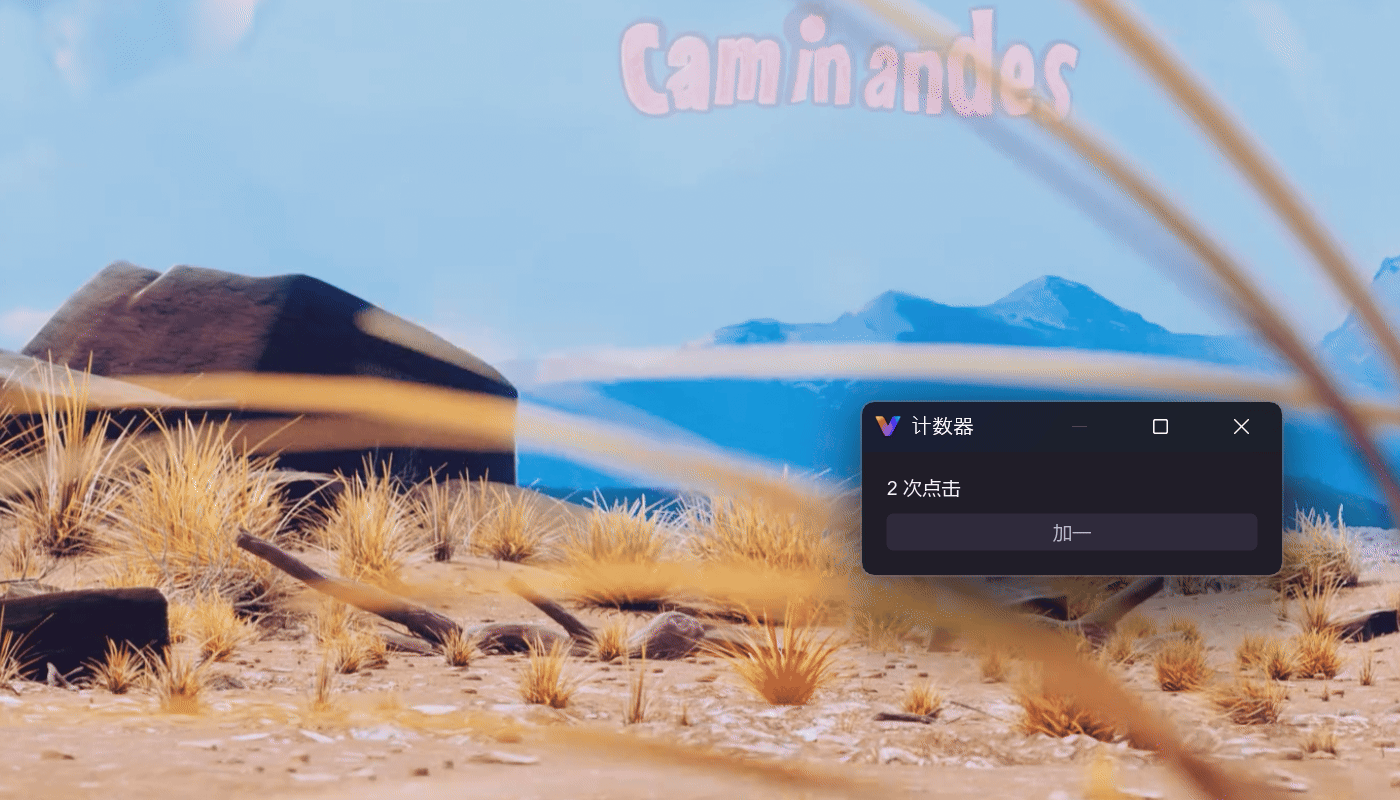
A plugin in the player's language. Tools ▸ Counter… opens a window with one button; each click counts and shows the count on the video. All texts are English in the source, and locales/zh-Hans.po translates them: with the player in Simplified Chinese the menu reads 工具 ▸ 计数器… and the window 2 次点击. The plugin contains no translation code.
What it demonstrates
English source text in declarations, Slint (@tr, plural forms) and OSD templates · vestra-plugin i18n extract and check · testing with startPlugin({ locale }).
Add settings and translations teaches the same steps.
What you'll build
Files
examples/i18n/
manifest.json name, punchline, description in English
main.ts the command, the window, an on-screen message
ui/counter.slint the window, its texts in @tr
locales/messages.pot every text to translate (vestra-plugin i18n extract)
locales/zh-Hans.po the Simplified Chinese translation
tests/main.test.ts the same plugin in English and in Chinese
The code
/**
* Counter: Tools ▸ Counter… opens a window with one button that counts
* clicks, in the player's language. The texts are English; the player
* translates them with locales/<lang>.po. Walkthrough: docs/examples/i18n.md.
*/
// #region activate
import type { Plugin } from "@vestra-player/sdk";
export default function activate(plugin: Plugin) {
let count = 0;
// #endregion activate
// #region window
// The window's texts are in its Slint file (@tr); TypeScript passes data.
const counterWindow = plugin.windows.create("ui/counter.slint");
counterWindow.bind(() => ({ count }));
counterWindow.on("add", () => {
count += 1;
// A template and its arguments, never a sentence built in TypeScript.
return plugin.osd.show("Count: {}", [count]);
});
// #endregion window
// #region command
// Declared texts are English; the player shows them translated.
plugin.commands.add({
id: "counter",
path: ["Tools", "Counter…"],
run: () => counterWindow.show(),
});
// #endregion command
}
- The menu path is English. The player shows each segment translated with the plugin's catalog; menus of all plugins merge by these English words.
- The window gets data (
count), not text. - plugin.osd.show takes a template and its arguments. The player translates
"Count: {}", then putscountinto{}. A sentence built in TypeScript (`Count: ${count}`) could not be translated.
The window
// The Counter window. Every text is @tr("English"): the player puts the
// translation in its place when it loads the file. Walkthrough:
// docs/examples/i18n.md.
import { Theme } from "@vestra/theme.slint";
import { Button } from "@vestra/widgets.slint";
export component CounterWindow inherits Window {
title: @tr("Counter");
width: 240px;
background: Theme.bg-panel;
in property <int> count;
callback add();
VerticalLayout {
padding: Theme.dialog-padding;
spacing: 8px;
Text {
// One form for 1, the other for every other number.
text: @tr("{n} click" | "{n} clicks" % root.count);
color: Theme.text;
font-size: Theme.font-body;
}
Button {
text: @tr("Add one");
clicked => { root.add(); }
}
}
}
Every text is in @tr("…"). The player replaces the English literal with the translation when it loads the file; Slint then fills in the arguments. "{n} click" | "{n} clicks" % root.count has two forms: the first for 1, the second for every other number ({n} is the number).
The translation
vestra-plugin i18n extract collected the texts into locales/messages.pot; extract --locale zh-Hans started locales/zh-Hans.po, and each msgstr was then filled in:
msgid ""
msgstr ""
"Language: zh-Hans\n"
"Content-Type: text/plain; charset=UTF-8\n"
"Content-Transfer-Encoding: 8bit\n"
"Plural-Forms: nplurals=1; plural=0;\n"
#: main.ts:20
msgid "Count: {}"
msgstr "计数:{}"
#: main.ts:28
msgid "Tools"
msgstr "工具"
#: main.ts:28
msgid "Counter…"
msgstr "计数器…"
#: manifest.json ui/counter.slint:8
msgid "Counter"
msgstr "计数器"
#: manifest.json
msgid "A click counter in the player's language"
msgstr "用播放器的界面语言显示的点击计数器"
#: manifest.json
msgid ""
"Tools ▸ Counter… opens a window with one button that counts clicks.\n"
"SDK example: a plugin translated into Simplified Chinese."
msgstr ""
"「工具 ▸ 计数器…」打开一个只有一个按钮的窗口,统计点击次数。\n"
"SDK 示例:翻译成简体中文的插件。"
#: manifest.json
msgid "example"
msgstr "示例"
#: ui/counter.slint:20
msgid "{n} click"
msgid_plural "{n} clicks"
msgstr[0] "{n} 次点击"
#: ui/counter.slint:25
msgid "Add one"
msgstr "加一"
Chinese has one plural form, so msgstr[0] is enough. vestra-plugin i18n check reports what is missing; vestra-plugin build compiles the file into dist/locales/zh-Hans.json, which the player reads.
The test
import assert from "node:assert/strict";
import test from "node:test";
import { startPlugin } from "@vestra-player/sdk/testing";
import activate from "../main.ts";
const directory = new URL("..", import.meta.url); // manifest.json and locales/
test("English: the texts as written", async () => {
const { host, stop } = await startPlugin(activate, {
directory,
locale: "en",
});
const counter = host.command("counter");
assert.deepEqual(counter.display.path, ["Tools", "Counter…"]);
await counter.run();
host.window("counter").emit("add");
await host.settle();
assert.deepEqual(host.osd, ["Count: 1"]);
await stop();
});
test("Simplified Chinese: the menu and the message from locales/zh-Hans.po", async () => {
const { host, plugin, stop } = await startPlugin(activate, {
directory,
locale: "zh-Hans",
});
assert.equal(plugin.i18n.locale, "zh-Hans");
const counter = host.command("counter");
// The key stays English; the menu shows the translation.
assert.deepEqual(counter.declaration.path, ["Tools", "Counter…"]);
assert.deepEqual(counter.display.path, ["工具", "计数器…"]);
await counter.run();
const counterWindow = host.window("counter");
counterWindow.emit("add");
counterWindow.emit("add");
await host.settle();
assert.equal(counterWindow.props["count"], 2);
assert.deepEqual(host.osd, ["计数:1", "计数:2"]);
await stop();
});
test("only the open window keeps the plugin running", async () => {
const { host, stop } = await startPlugin(activate, {
directory: directory,
});
const keepsRunning = () => host.keepsRunning;
await host.settle();
assert.deepEqual(keepsRunning(), []);
await host.command("counter").run();
await host.settle();
assert.deepEqual(keepsRunning(), ["an open window (counter)"]);
host.window("counter").userClose();
await host.settle();
assert.deepEqual(keepsRunning(), []);
await stop();
});
startPlugin(activate, { directory, locale }) loads the catalog of that language. host.command(id).display is the menu as the user sees it, declaration what the code declared; host.osd lists the messages as shown.
Run it
npm ci # once, in the SDK repository root
cd examples/i18n
npm install
npm run check && npm test
npm run i18n # extract again and check
Start the player with --plugin <path to examples/i18n>, choose 简体中文 among the Language commands of the command palette (Ctrl+Shift+P) and restart.