Example: Adjust panel
A speed slider in the player's adjust column, the column of controls for what is playing. It shows how to choose a slot by what a panel is for, how a key opens the column at your tab, how home puts that key under the tab, and how a panel follows playback only while it is on screen, so the plugin can be stopped while the column is closed.
What it demonstrates
The "adjust" slot · Panel.toggle as the panel's own key · CommandOptions.home · a stream only while the tab is on screen, opened and stopped on layout.changed · a when condition for the command.
Open a tool window and remember its state teaches the view surface panels share with tool windows; Keep a slider responsive while dragging covers the slider itself; Learn what happens in the player without staying up covers the stream while shown.
What you'll build
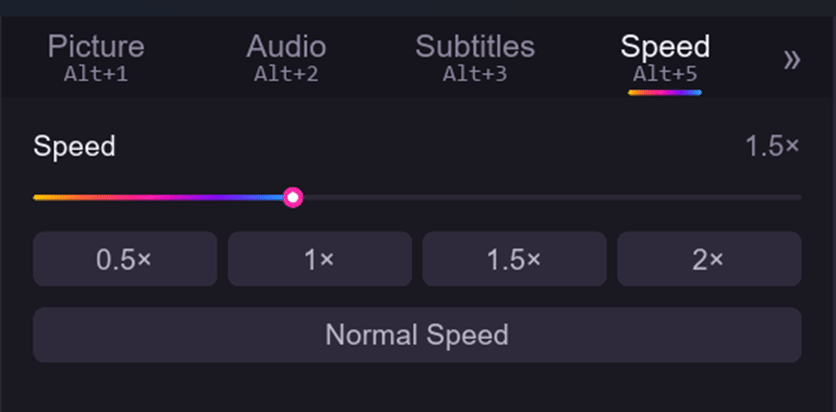
- A Speed tab in the adjust column: the speed, a slider from 0.25× to 4×, four presets and Normal Speed.
- Alt+5 opens the adjust column at this tab; pressing it again while the tab is shown closes the column. The player shows
Alt+5under the tab's title. - Normal Speed is also a command (in the command palette and Keyboard Shortcuts) that lives in this panel.
Sidebar or adjust?
Ask: after the user closes the panel, do they still look at what it showed? A playlist, chapters or search results: yes, so they are content and go in "sidebar". A speed slider: no, it only changes what is playing, so it goes in "adjust". The slot is a contract about purpose; the player decides how the column looks, and that may change.
Files
examples/adjust-panel/
manifest.json identity
main.ts the code
ui/speed.slint the panel
tests/adjust-panel.test.ts tests against the SDK's in-memory player
package.json the SDK as a dev dependency, and the scripts
The manifest
{
"id": "examples.adjust-panel",
"version": "0.1.0",
"apiVersion": "vestra/1",
"entry": "main.ts",
"minPlayerVersion": "0.11.0",
"name": "Speed Panel",
"author": "Vestra Player SDK examples",
"punchline": "A speed slider in the player's adjust column",
"description": "A tab in the adjust column, beside the video: a slider and presets for the playback speed. Alt+5 opens the column at this tab and closes it again.\nSDK example: the adjust slot, a panel command and its home.",
"tags": ["playback", "speed", "panel", "example"]
}
minPlayerVersion is 0.11.0, the first player that sends layout.changed. await plugin.player.read(), first in activate, reads the player's state once; from then on plugin.player.state follows the player only while the tab is shown (below).
The panel in Slint
import { Button, Slider } from "@vestra/widgets.slint";
import { Theme } from "@vestra/theme.slint";
export global SpeedBridge {
in-out property <float> rate: 1;
in property <bool> enabled: true;
callback rate-changed(float);
callback reset();
}
// The adjust column is about 317 px wide: one column of rows, top to bottom.
export component SpeedPanel inherits Rectangle {
background: Theme.bg-list;
VerticalLayout {
padding: 12px;
spacing: 8px;
alignment: start;
HorizontalLayout {
Text {
text: @tr("Speed");
color: Theme.text;
font-size: Theme.font-body;
vertical-alignment: center;
}
Text {
text: round(SpeedBridge.rate * 100) / 100 + "×";
color: Theme.text-dim;
font-size: Theme.font-body;
horizontal-alignment: right;
vertical-alignment: center;
}
}
Slider {
enabled: SpeedBridge.enabled;
minimum: 0.25;
maximum: 4;
value <=> SpeedBridge.rate;
changed(value) => { SpeedBridge.rate-changed(value); }
}
HorizontalLayout {
spacing: 4px;
// Four presets fit the column at its least width (280 px).
for preset in [0.5, 1, 1.5, 2]: Button {
text: preset + "×";
enabled: SpeedBridge.enabled;
clicked => { SpeedBridge.rate-changed(preset); }
}
}
Button {
text: @tr("Normal Speed");
enabled: SpeedBridge.enabled;
clicked => { SpeedBridge.reset(); }
}
}
}
- The column is about 317 px wide (280 at least): one column of rows, top to bottom, and four presets in a row, which fit 280 px. A panel wider than its column is clipped to it.
rateisin-outso the slider can bind to it two-way (<=>) and still follow the speed the plugin writes.- The player draws the tab strip above the panel and the column's ground; the panel draws its own background in
Theme.bg-listlike the player's panels.
The code
Mounting the panel
// "adjust": the panel changes what is playing. After the user closes it,
// they do not keep looking at it (that would be the sidebar).
const panel = plugin.panels.mount("adjust", "ui/speed.slint", {
title: "Speed",
});
- plugin.panels.mount with
"adjust";titleis the tab's label.
Following the speed while the tab shows
// The speed has no event: while the tab is on screen a stream keeps
// `player.state` following the player (and runs the binding below after
// each change). While the column is closed nothing follows it, and the
// plugin can go to standby.
let feed: StateStream | undefined;
const follow = () => {
if (panel.state?.effective) feed ??= player.stream(() => {});
else {
feed?.stop();
feed = undefined;
}
};
// Sent once per change of the layout (the column opened or closed, another
// tab chosen); listening to it keeps no plugin running.
player.on("layout.changed", follow);
// And once at the mount, for a column already open when the plugin starts.
// `panel.state` is read on first use; touched before the mount, it is
// current when `ready` resolves.
void panel.state;
void panel.ready.then(follow, () => {});
- The speed has no event of its own, so the panel follows it with a stream (plugin.player.stream):
player.stateis updated at every change and the binding below runs again. The stream is open only whilepanel.state.effectiveis true, that is while the column is open at this tab. layout.changedsays when the column opens or closes or another tab is chosen. A listener of it does not keep the plugin running: the player starts a stopped plugin to deliver it. Showing the tab starts the plugin too, and the check atreadyopens the stream for a column that is already open then (the player then keeps the plugin running for that run).- With the column closed nothing of the plugin follows the player, and the player stops it after its idle time; its tab, its key and Normal Speed's state stay.
Binding the panel
// Sent when the panel mounts, then whenever the playback state changes.
panel.bind(() => ({
rate: player.state.rate,
enabled: player.state.can.rate,
}));
const setRate = (rate: number) =>
player.setRate(Math.round(rate * 100) / 100);
panel.on("rateChanged", setRate);
bindsends the speed and whether the source can change it; the slider and the presets callrateChanged.
The key and the home
// Opens the adjust column at this tab, and closes it when this tab is
// already the one shown (`toggle`), like the player's own Alt+1…4.
plugin.commands.add({
id: "speed",
title: "Speed Panel",
category: "Playback",
bindings: ["Alt+5"],
run: () => panel.toggle(),
});
// `home` names the command that opens the panel this one lives in: the
// player shows that command's key under the tab, and the command palette
// shows where this command lives.
plugin.commands.add({
id: "speed-reset",
title: "Normal Speed",
category: "Playback",
home: "speed",
enabled: when.can("rate"), // evaluated by the player, also in standby
run: () => setRate(1),
});
panel.on("reset", () => setRate(1));
speedcalls panel.toggle: it opens the column at this tab, or closes the column when this tab is already the one shown, the way the player's own Alt+1…4 work.speed-resetis enabled by the conditionwhen.can("rate"), which the player evaluates itself, also while the plugin is stopped.speed-resetnamesspeedas itshome. The player then knows thatspeedopens the panel this command lives in: it showsspeed's key under the tab, and the command palette shows where Normal Speed lives.
The tests
import assert from "node:assert/strict";
import test from "node:test";
import { startPlugin, TestHost } from "@vestra-player/sdk/testing";
import activate from "../main.ts";
const directory = new URL("..", import.meta.url);
test("the panel is a tab of the adjust column, which starts closed", async () => {
const { host, stop } = await startPlugin(activate, { directory });
const panel = host.mounted();
assert.equal(panel.slot, "adjust");
assert.equal(host.layout.adjust?.panels?.[0]?.title, "Speed");
assert.equal(host.layout.adjust?.preferred, false);
await stop();
});
test("Alt+5 opens the column at this tab, and closes it again", async () => {
const host = new TestHost();
host.mountOther("adjust", "vestra.video", { title: "Picture" });
const { stop } = await startPlugin(activate, { directory, host });
host.selectTab("vestra.video");
await host.settle();
await host.command("speed").run();
await host.settle();
assert.equal(host.layout.adjust?.preferred, true);
assert.equal(host.layout.adjust?.owner, 1, "this plugin's tab is current");
await host.command("speed").run();
await host.settle();
assert.equal(host.layout.adjust?.preferred, false);
await stop();
});
test("while the tab is shown, the panel follows a file opened elsewhere", async () => {
const { host, stop } = await startPlugin(activate, { directory });
const panel = host.mounted();
await host.command("speed").run(); // the column opens at this tab
await host.settle();
assert.equal(panel.props.enabled, false, "nothing to change the speed of");
host.openElsewhere("/movie.mp4");
host.setSource({ duration: 600, position: 10, rate: 1.25 });
await host.settle();
assert.equal(panel.props.enabled, true);
assert.equal(panel.props.rate, 1.25);
await stop();
});
test("the slider and the reset change the speed", async () => {
const host = new TestHost();
host.openElsewhere("/movie.mp4");
host.setSource({ duration: 600, position: 10 });
const { stop } = await startPlugin(activate, { directory, host });
const panel = host.mounted();
panel.emit("rate-changed", 1.5);
await host.settle();
assert.equal(host.source.rate, 1.5);
assert.equal(panel.props.rate, 1.5);
await host.command("speed-reset").run();
await host.settle();
assert.equal(host.source.rate, 1);
assert.equal(host.command("speed-reset").declaration.home, "speed");
await stop();
});
test("Normal Speed follows the player with no stream open", async () => {
const { host, stop } = await startPlugin(activate, { directory });
assert.equal(host.command("speed-reset").state.enabled, false);
host.openElsewhere("/movie.mp4"); // the player evaluates when.can("rate")
assert.equal(host.command("speed-reset").state.enabled, true);
await stop();
});
test("only the shown tab keeps the plugin running", async () => {
const { host, stop } = await startPlugin(activate, { directory });
const keepsRunning = () => host.keepsRunning;
await host.settle();
assert.deepEqual(keepsRunning(), [], "the column is closed");
await host.command("speed").run(); // opens the column at this tab
await host.settle();
assert.ok(keepsRunning().includes("its adjust tab is the current tab"));
assert.ok(keepsRunning().some((why) => why.includes("a stream")));
await host.command("speed").run(); // closes it
await host.settle();
assert.deepEqual(keepsRunning(), []);
await stop();
});
// #region source-changes
// The user changes the source between the plugin's read in `activate` and
// Normal Speed. Each change advances the player's source stamp as the
// player does: `openElsewhere` starts a new generation (also for the same
// file), a core action is a new intent. A control the plugin makes with an
// older copy of the state is refused with `stale`, and a host error the
// test does not expect fails it (`host.strictErrors`).
const changes: [string, string | null, (host: TestHost) => Promise<void>][] = [
[
"a file opened after activation",
null,
async (host) => host.openElsewhere("/movie.mp4"),
],
[
"another file opened",
"/movie.mp4",
async (host) => host.openElsewhere("/other.mp4"),
],
[
"the same file opened again",
"/movie.mp4",
async (host) => host.openElsewhere("/movie.mp4"),
],
[
"the user paused (Space)",
"/movie.mp4",
(host) => host.coreAction("play-pause").run(),
],
];
/** Start with `atStart` open at 1.5×, make the change, run Normal Speed. */
async function normalSpeedAfter(
atStart: string | null,
act: (host: TestHost) => Promise<void>,
shown: boolean,
) {
const host = new TestHost();
if (atStart) host.openElsewhere(atStart);
const { stop } = await startPlugin(activate, { directory, host });
try {
if (shown) await host.command("speed").run(); // a stream follows the state
await act(host);
host.setSource({ rate: 1.5 });
await host.settle();
await host.command("speed-reset").run();
assert.equal(host.source.rate, 1);
} finally {
await stop();
}
}
for (const [change, atStart, act] of changes) {
test(`Normal Speed works after ${change}, the column closed`, () =>
normalSpeedAfter(atStart, act, false));
test(`Normal Speed works after ${change}, the tab shown`, () =>
normalSpeedAfter(atStart, act, true));
}
// #endregion source-changes
host.layout.adjustis the adjust column as the player reports it; it starts hidden (preferred: false).host.mountOther("adjust", …)adds another plugin's tab, andhost.selectTabmakes it current.host.keepsRunningis what would keep the plugin running: empty while the column is closed; the current tab and the stream while it is open.
Run it
npm ci # once, in the SDK repository root
cd examples/adjust-panel
npm install
npm run check && npm test
npm run pack # examples.adjust-panel-0.1.0.vxp
Start the player with --plugin <path to examples/adjust-panel> and press Alt+5, or click the bottom bar's Adjustments and Effects button (the sliders).
Try next
- More controls. Add a fine step (±0.05) as two buttons and two commands with
home: "speed"; their keys can show next to them withKeyHintandplugin.commands.keys. - Show the speed elsewhere. A label in a tool window follows the speed the same way: a stream while it is open. (Not in the bottom bar: the player's control bar holds it.)