Example: Bookmark
A tool window whose buttons follow the playback state: Mark remembers where playback is, Jump goes back there. It shows the pattern most plugins with a window use: the window's properties are bound to state, its buttons call back into the plugin, and the playback state is followed only while the window is open.
What it demonstrates
A tool window whose properties are bound to the playback state · handling its buttons · a stream while the window is open · state kept in session storage through standby.
Open a tool window and remember its state teaches a window bound to the playback state; Test a plugin uses its test as the complete example.
What you'll build
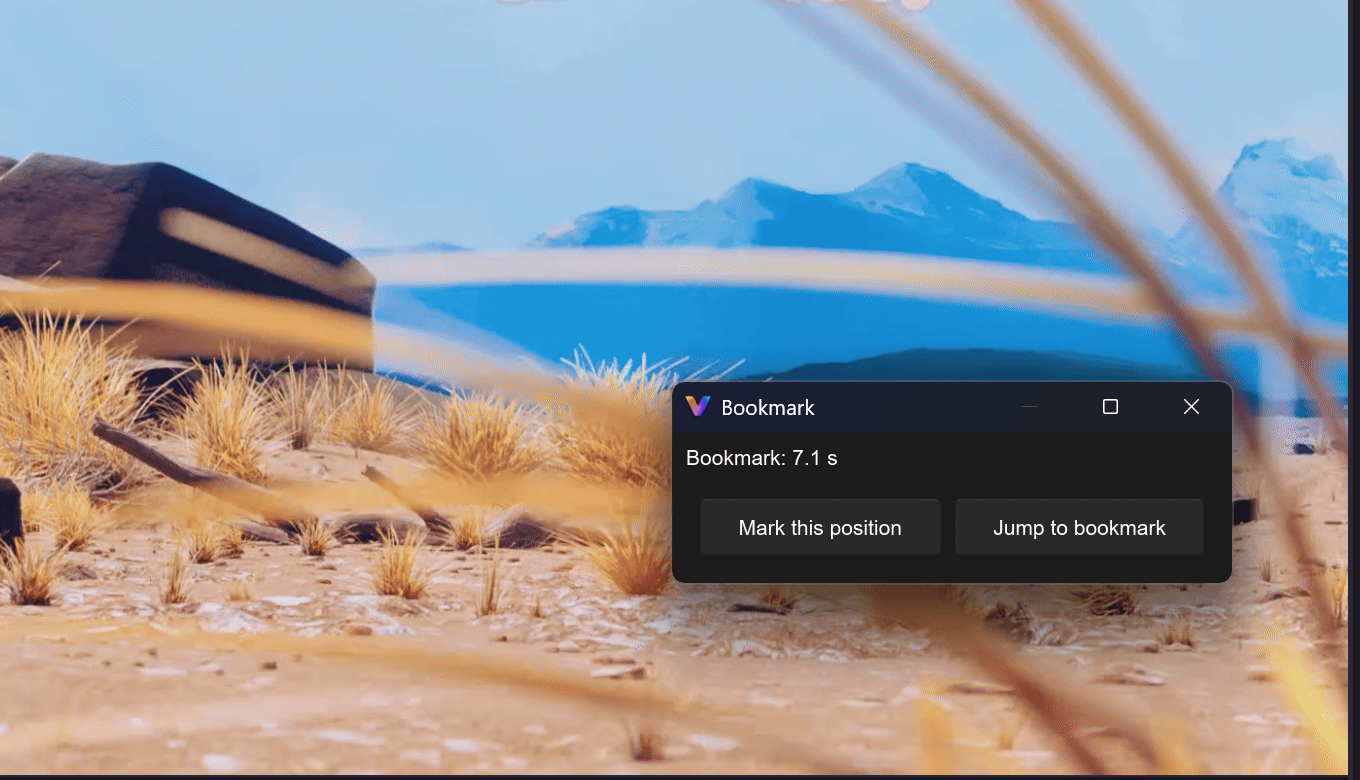
- Playback ▸ Bookmark… opens the Bookmark window.
- Mark this position stores the current position. It is greyed out while nothing is open.
- Jump to bookmark seeks back to it. It is greyed out until there is a bookmark and the video can seek.
Files
examples/bookmark/
manifest.json identity
main.ts the code
ui/bookmark.slint the window
tests/bookmark.test.ts a test against the SDK's in-memory player
package.json the SDK as a dev dependency, and the scripts
The manifest
{
"id": "examples.bookmark",
"version": "0.1.0",
"apiVersion": "vestra/1",
"entry": "main.ts",
"minPlayerVersion": "0.9.0"
}
await plugin.player.read(), first in activate, reads the position and whether the video can seek once; while the window is open a stream keeps that state up to date (below).
The window
import { Button, VerticalBox, HorizontalBox } from "std-widgets.slint";
export component BookmarkWindow inherits Window {
title: "Bookmark";
preferred-width: 320px;
in property <string> label: "No bookmark";
in property <bool> can-mark;
in property <bool> can-jump;
callback mark();
callback jump();
VerticalBox {
Text { text: root.label; }
HorizontalBox {
Button { text: "Mark this position"; enabled: root.can-mark; clicked => { root.mark(); } }
Button { text: "Jump to bookmark"; enabled: root.can-jump; clicked => { root.jump(); } }
}
}
}
- The buttons and layouts come from Slint's standard library.
- The file exports one component that inherits
Window.titleis the title bar's text. - The three
in propertylines are the data the plugin writes: the label and whether each button is enabled. - The two
callbacklines are what the window reports back: a click on each button. - Each
Buttonis enabled by one property and calls one callback.
Names are converted for you: Slint's can-mark is canMark in TypeScript.
The code
The state
export default async function activate(plugin: Plugin) {
const { player, storage } = plugin;
await player.read(); // the player's state, read once
// Session storage outlives standby: the player may stop this plugin while
// the window is closed, and `activate` runs again at its next use.
let mark = (await storage.session.get<number>("mark")) ?? null;
playerisplugin.player, kept in a constant because the code reads it several times.markis the plugin's whole state: a position in seconds, ornullfor no bookmark. It is kept in plugin.storage.session, because the player stops the plugin while its window is closed and nothing uses it;activateruns again at its next use and starts from the stored value.
The window, bound to the state
const bookmarkWindow = plugin.windows.create("ui/bookmark.slint");
// Re-evaluated after every handler and player change; only changes are sent.
bookmarkWindow.bind(() => ({
label: mark === null ? "No bookmark" : `Bookmark: ${mark.toFixed(1)} s`,
canMark: player.state.position !== null,
canJump: mark !== null && player.state.can.seek,
}));
// The Slint callbacks `mark` and `jump` of ui/bookmark.slint.
bookmarkWindow.on("mark", () => {
mark = player.state.position;
return storage.session.set("mark", mark);
});
bookmarkWindow.on("jump", () => player.seek(mark!));
- plugin.windows.create makes a handle. Nothing opens yet.
- bookmarkWindow.bind gives the function that computes the window's properties. The SDK calls it again after every handler and every change of the player's state, and sends only what changed. So there is no update code:
labelfollowsmark.canMarkfollowsplayer.state.position, which isnullwhile nothing is open.canJumpneeds a bookmark and a video that can seek.
- bookmarkWindow.on handles a callback.
markstores the position;jumpseeks back. The!is safe because the button is only enabled while there is a bookmark. - Register callbacks before the first
show(): a tool window takes its callbacks when it opens.
The menu command
// The position has no event: while the window is open a stream keeps
// `player.state` following the player and runs the binding above after
// each change. Closed, nothing follows it and the plugin can go to standby.
let feed: StateStream | undefined;
bookmarkWindow.onClose(() => {
feed?.stop();
feed = undefined;
});
plugin.commands.add({
id: "bookmark.open",
path: ["@playback", "Bookmark…"],
order: 270,
run: async () => {
await bookmarkWindow.show(); // opens it, or brings back the open one
feed ??= player.stream(() => {});
},
});
path: ["@playback", "Bookmark…"]adds the item to the player's own Playback menu. A first segment that starts with@names a built-in menu (MenuId).order: 270places it among the Playback menu's items.runopens the window with bookmarkWindow.show(). The bound values are already in place when it appears.
The test
import assert from "node:assert/strict";
import test from "node:test";
import { startPlugin, TestHost } from "@vestra-player/sdk/testing";
import activate from "../main.ts";
const directory = new URL("..", import.meta.url);
// #region mark-jump
test("mark the position, then jump back to it", async () => {
const host = new TestHost();
host.openElsewhere("/movie.mp4");
host.setSource({ duration: 600, position: 42 });
const { stop } = await startPlugin(activate, { directory, host });
await host.command("bookmark.open").run();
const bookmarkWindow = host.window("bookmark");
bookmarkWindow.emit("mark");
await host.settle();
assert.equal(bookmarkWindow.props.label, "Bookmark: 42.0 s");
host.setSource({ position: 300 }); // playback moves on
bookmarkWindow.emit("jump");
await host.settle();
assert.equal(host.source.position, 42);
await stop();
});
// #endregion mark-jump
test("the open window follows playback; closed, nothing keeps the plugin running", async () => {
const host = new TestHost();
const { stop } = await startPlugin(activate, { directory, host });
const keepsRunning = () => host.keepsRunning;
await host.settle();
assert.deepEqual(keepsRunning(), []);
await host.command("bookmark.open").run();
await host.settle();
const bookmarkWindow = host.window("bookmark");
assert.equal(bookmarkWindow.props["can-mark"], false, "nothing open");
host.openElsewhere("/movie.mp4"); // opened elsewhere: the stream follows
host.setSource({ duration: 600, position: 5 });
await host.settle();
assert.equal(bookmarkWindow.props["can-mark"], true);
assert.ok(keepsRunning().some((why) => why.includes("a stream")));
bookmarkWindow.userClose(); // the user closes it
await host.settle();
assert.deepEqual(keepsRunning(), []);
await stop();
});
test("the bookmark outlives a stop of the plugin", async () => {
const host = new TestHost();
host.openElsewhere("/movie.mp4");
host.setSource({ duration: 600, position: 42 });
const first = await startPlugin(activate, { directory, host });
await host.command("bookmark.open").run();
host.window("bookmark").emit("mark");
await host.settle();
await first.stop({ reason: "idle" }); // nothing used it: standby
// Its next use starts it again within the same player session.
const again = await startPlugin(activate, {
directory,
sessionStorage: host.sessionStorage,
});
await again.host.command("bookmark.open").run();
await again.host.settle();
assert.equal(again.host.window("bookmark").props.label, "Bookmark: 42.0 s");
await again.stop();
});
// #region source-changes
// The user changes the source after the plugin read the state, then jumps
// to the bookmark. Each change advances the player's source stamp as the
// player does: `openElsewhere` starts a new generation (also for the same
// file), a core action is a new intent. A control the plugin makes with an
// older copy of the state is refused with `stale`, and a host error the
// test does not expect fails it (`host.strictErrors`).
const changes: [string, (host: TestHost) => Promise<void>][] = [
["another file opened", async (host) => host.openElsewhere("/other.mp4")],
[
"the same file opened again",
async (host) => host.openElsewhere("/movie.mp4"),
],
["the user paused (Space)", (host) => host.coreAction("play-pause").run()],
];
for (const [change, act] of changes)
for (const reopen of [false, true])
test(`jump after ${change}, the window ${reopen ? "closed meanwhile" : "open"}`, async () => {
const host = new TestHost();
host.openElsewhere("/movie.mp4");
host.setSource({ duration: 600, position: 42 });
const { stop } = await startPlugin(activate, { directory, host });
try {
await host.command("bookmark.open").run();
host.window("bookmark").emit("mark");
await host.settle();
if (reopen) {
host.window("bookmark").userClose(); // nothing follows the state
await host.settle();
}
await act(host);
host.setSource({ duration: 600, position: 300 });
await host.settle();
if (reopen) await host.command("bookmark.open").run();
host.window("bookmark").emit("jump");
await host.settle();
assert.equal(host.source.position, 42);
} finally {
await stop();
}
});
// #endregion source-changes
host.openElsewhereandhost.setSourceplay the user's part: a file is open at 42 seconds.host.window("bookmark")is the window, named after its file.emit("mark")acts like a click;propsholds its properties by their Slint names.await host.settle()waits until the SDK has caught up. Settle before every assertion.- After the jump,
host.source.positionis back at 42.
Run it
npm ci # once, in the SDK repository root
cd examples/bookmark
npm install
npm run check && npm test
npm run pack # examples.bookmark-0.1.0.vxp
Start the player with --plugin <path to examples/bookmark>, open a video, choose Playback ▸ Bookmark…, click Mark, let it play on, then click Jump.
Try next
- Keep the bookmark after a restart with plugin.storage
.json("bookmark", { defaults: { mark: null } }). See Open a tool window and remember its state. - Show it on the seek bar with a mark of kind
"bookmark"fromplugin.timeline.layer(). - A shortcut to jump: a command with
title: "Jump to bookmark",bindings: ["Ctrl+Alt+J"]andenabled: () => mark !== null.