Example: Markdown
A window that shows a formatted Markdown document with the player's MarkdownView component. The plugin never parses Markdown: it passes the text to the player, which parses and draws it.
What it demonstrates
plugin.ui.markdown and MarkdownView · images relative to the package · packing a non-code file.
Open a tool window and remember its state teaches tool windows; the Markdown view's properties are in Theme.
What you'll build
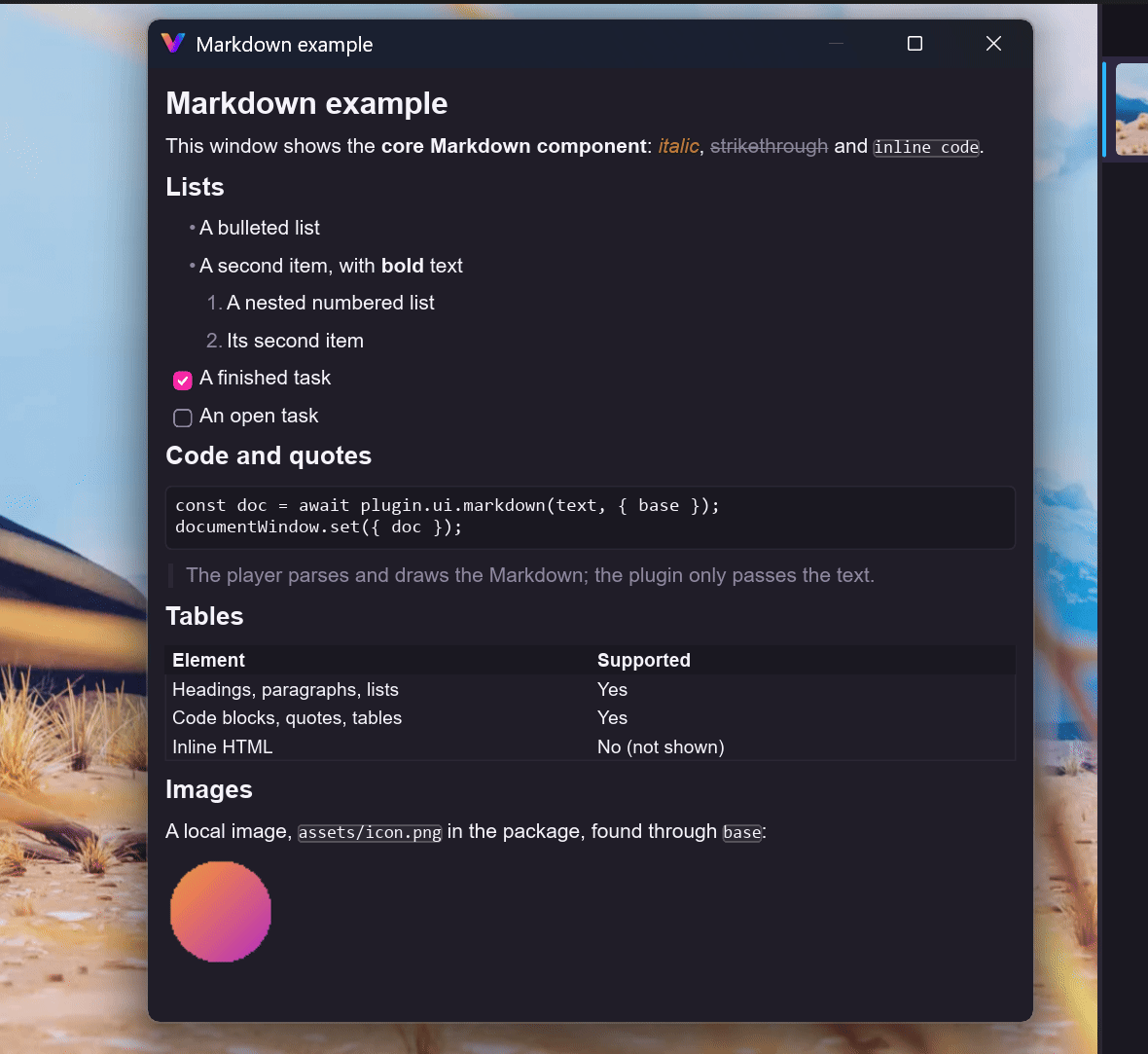
Tools ▸ Markdown example… opens a window that shows sample.md: headings, lists, a code block, a quote, a table and an image from the package.
Files
examples/markdown/
manifest.json identity and display fields
main.ts the code
ui/document.slint the window
sample.md the document it shows
assets/icon.png the plugin's icon, also the image in sample.md
tests/markdown.test.ts a test against the SDK's in-memory player
package.json the SDK as a dev dependency, the scripts, and assets
The manifest
{
"id": "examples.markdown",
"version": "0.1.0",
"apiVersion": "vestra/1",
"entry": "main.ts",
"name": "Markdown example",
"author": "Vestra Player",
"punchline": "A window that shows a Markdown document",
"description": "Opens a window that shows a Markdown document: headings, lists, code, quotes, tables and an image.",
"tags": ["Example", "Markdown"],
"icon": "assets/icon.png",
"license": "Apache-2.0",
"minPlayerVersion": "0.9.0"
}
nametolicenseare display fields for the plugin manager. They do not affect how the plugin runs, and any plugin can have them; Manifest lists their rules.
The package file
{
"name": "vestra-example-markdown",
"version": "0.1.0",
"private": true,
"type": "module",
"scripts": {
"check": "vestra-plugin check",
"build": "vestra-plugin build",
"test": "vestra-plugin test",
"pack": "vestra-plugin pack"
},
"devDependencies": {
"@vestra-player/sdk": "file:../.."
},
"vestra": {
"assets": [
"sample.md"
]
}
}
vestra-plugin build leaves Markdown files out of the package (except README.md, CHANGELOG.md and the manifest's readme and changelog; see What build puts into dist/), so sample.md is listed under "vestra": { "assets": [...] }, which copies files into the package as they are. assets/icon.png needs no entry: the build copies images anyway.
The window
import { MarkdownView, MarkdownBlock } from "@vestra/markdown.slint";
import { Theme } from "@vestra/theme.slint";
export component Document inherits Window {
title: "Markdown example";
preferred-width: 520px;
preferred-height: 560px;
min-width: 280px;
min-height: 200px;
background: Theme.bg-panel;
in property <[MarkdownBlock]> doc;
MarkdownView {
blocks: root.doc;
}
}
MarkdownViewand its block typeMarkdownBlockcome from@vestra/markdown.slint, supplied by the player at run time.- The preferred and minimum sizes give the window its first size and keep it usable when shrunk.
docis the document, a[MarkdownBlock]property. The plugin never builds these blocks itself; it writes the valueplugin.ui.markdownreturns.MarkdownViewfills the window and scrolls a long document.
The code
Imports
import { readFileSync } from "node:fs";
import { fileURLToPath } from "node:url";
import type { Plugin } from "@vestra-player/sdk";
readFileSync reads the document; fileURLToPath turns the module's address into a path.
The window and the command
// Relative links and images in sample.md resolve against this folder.
const directory = fileURLToPath(new URL(".", import.meta.url));
const documentWindow = plugin.windows.create("ui/document.slint");
plugin.commands.add({
id: "show",
path: ["@tools", "Markdown example…"],
run: async () => {
const text = readFileSync(new URL("sample.md", import.meta.url), "utf8");
// `doc` is the window's [MarkdownBlock] property, drawn by MarkdownView.
documentWindow.set({
doc: await plugin.ui.markdown(text, { base: directory }),
});
await documentWindow.show();
},
});
directoryis the foldermain.ts(or, in a package,main.js) is in: the package directory, wherever it is installed.- plugin.windows.create makes the window handle; nothing opens yet.
rundoes three things each time the item is chosen:- It reads
sample.mdfrom the package. Reading it on every run means an edited file shows its changes the next time. - plugin.ui.markdown prepares the document.
baseis what relative images resolve against, soassets/icon.pngin the text means the package's icon. Withoutbase, the image shows its alternative text. - documentWindow.set writes the document, then
show()opens the window.setrather thanbind, because the document is a one-off value, not something computed from state. Set beforeshow(), it is there when the window appears.
- It reads
The test
import assert from "node:assert/strict";
import { fileURLToPath } from "node:url";
import test from "node:test";
import { startPlugin } from "@vestra-player/sdk/testing";
import activate from "../main.ts";
const directory = new URL("..", import.meta.url);
test("the window shows sample.md, with the package as its base", async () => {
const { host, stop } = await startPlugin(activate, { directory });
await host.command("show").run();
await host.settle();
const documentWindow = host.window("document");
assert.equal(documentWindow.visible, true);
const doc = host.markdown(documentWindow.props.doc);
assert.ok(doc);
assert.match(doc.text, /^# Markdown example/);
assert.equal(doc.base, fileURLToPath(directory));
await stop();
});
test("only the open window keeps the plugin running", async () => {
const { host, stop } = await startPlugin(activate, {
directory: directory,
});
const keepsRunning = () => host.keepsRunning;
await host.settle();
assert.deepEqual(keepsRunning(), []);
await host.command("show").run();
await host.settle();
assert.deepEqual(keepsRunning(), ["an open window (document)"]);
host.window("document").userClose();
await host.settle();
assert.deepEqual(keepsRunning(), []);
await stop();
});
host.markdown() reads the document back from the window's property: its text and its base.
Run it
npm ci # once, in the SDK repository root
cd examples/markdown
npm install
npm run check && npm test
npm run pack # examples.markdown-0.1.0.vxp
Start the player with --plugin <path to examples/markdown> and choose Tools ▸ Markdown example…. Edit sample.md and choose it again to see the change.
Try next
- Open links. Add
callback open-link(string);to the window, forwardlink-clicked(url) => { root.open-link(url); }fromMarkdownView, and handle it withdocumentWindow.on("openLink", (url: string) => plugin.system.openUrl(url))before the firstshow(). - Remote images. Put
in the document:ui.markdowndownloadshttps:images first (passremoteImages: falseto turn that off). - Copy code. Set
code-copy: trueonMarkdownView: code blocks get a Copy button (labelled in the interface language) that reportscopy-code(code). Forward it as a callback and copy the text with plugin.clipboard. - Selectable text. Set
selectable: trueonMarkdownView: the reader can select a paragraph with the mouse and copy it with Ctrl+C or the right-click menu, and a paragraph with links copies with each address after its link text. Code blocks are selectable without it. - Show the plugin's own README instead of
sample.md; the build always packs the README.