Example: Menus
What a menu item can look like: radio items, separator groups, a greyed-out item, and an item whose title changes. The items set the playback speed.
What it demonstrates
Radio items · order and separator groups · changing an item's title by rebuilding a child scope.
The Tutorial teaches a first menu item; the rules for titles, groups and order are in Design rules.
What you'll build
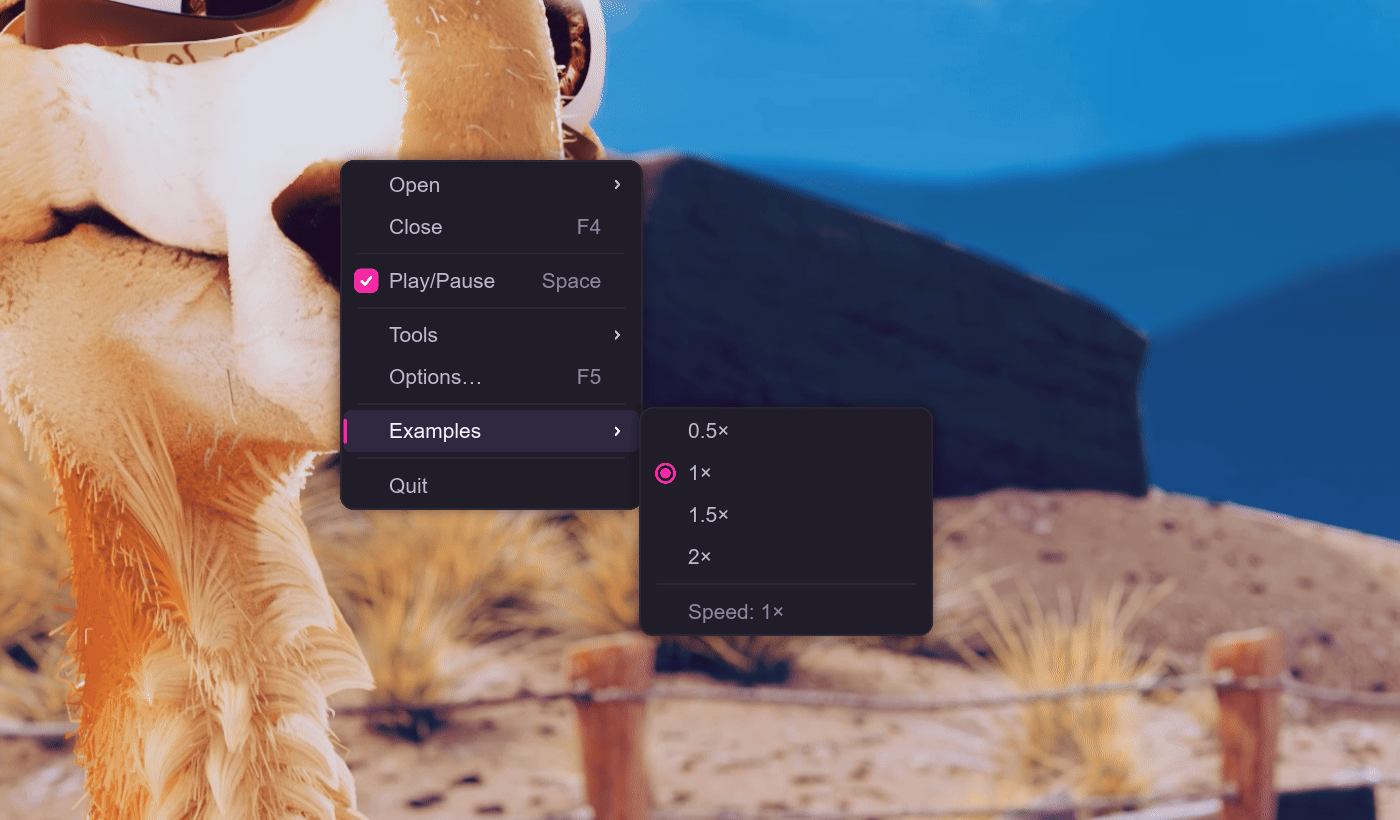
An Examples menu in the main menu:
Examples ▸ ○ 0.5×
● 1×
○ 1.5×
○ 2×
──────────
Speed: 1× (greyed out)
Picking a speed changes the playback speed, moves the radio dot and changes the last item's title.
Files
examples/menus/
manifest.json identity
main.ts the code
tests/menus.test.ts tests against the SDK's in-memory player
package.json the SDK as a dev dependency, and the scripts
The manifest
{
"id": "examples.menus",
"version": "0.1.0",
"apiVersion": "vestra/1",
"entry": "main.ts",
"minPlayerVersion": "0.10.0"
}
minPlayerVersion is 0.10.0, the first player that evaluates when.rate. await plugin.player.read(), first in activate, reads the current speed once, for the title.
The code
Setup
import type { Plugin, Scope } from "@vestra-player/sdk";
/** Menu items: radio items, separator groups and a title that changes. */
export default async function activate(plugin: Plugin) {
const { player, when } = plugin;
await player.read(); // the player's state, read once
player is plugin.player, kept in a constant because the code reads it several times.
An item whose title changes
let status: Scope = plugin.scope();
async function showSpeed(rate: number) {
await status.dispose(); // removes the previous item from the menu
status = plugin.scope();
status.commands.add({
id: "speed",
path: ["Examples", `Speed: ${rate}×`],
order: 860,
group: "status",
enabled: false,
run() {},
});
}
await showSpeed(player.state.rate);
A command's title and path cannot change after it is added. To change them, remove the command and add it again; a child scope makes that easy.
statusis a child scope from plugin.scope(). Everything added through it belongs to it.showSpeeddisposes the old scope, which removes the old item from the menu, then makes a new scope and adds the item with the new title.order: 860puts it after the speeds;group: "status"differs from the speeds' group, so the player draws a separator line between them.enabled: falsegreys it out: it only shows information.runis still required.- The last line adds the first version, with the current speed.
Radio items
// The check marks and the enabled state are conditions: the player
// evaluates them itself, also when the speed changes elsewhere and while
// this plugin is in standby. `when.rate` takes an interval, min ≤ rate < max.
for (const [index, rate] of [0.5, 1, 1.5, 2].entries())
plugin.commands.add({
id: `rate-${rate}`,
path: ["Examples", `${rate}×`],
order: 850 + index,
group: "speeds",
radio: true,
checked: when.rate({ min: rate - 0.005, max: rate + 0.005 }),
enabled: when.can("rate"),
run: async () => {
await player.setRate(rate);
await showSpeed(rate);
},
});
- The loop adds one command per speed.
entries()gives the index fororder, so the items appear in that order (850 to 853). - All four share the menu path's first segment,
"Examples", so they land in the same submenu; the submenu itself sits where its first item sits. group: "speeds"keeps them in one block.radio: truedrawscheckedas a dot instead of a check mark. Which item is checked is a condition:when.rate({ min, max })holds while the speed is in that interval, and the narrow interval around each item's speed absorbs rounding. The player evaluates it itself, so the dot also moves when the speed changes in some other way, and the menu stays right while the plugin is stopped.enabled: when.can("rate")greys the items out where the source cannot change speed.enabledgreys the items out while the video cannot change speed, for example with nothing open.runchanges the speed with player.setRate, then rebuilds the status item.
The tests
import assert from "node:assert/strict";
import test from "node:test";
import { startPlugin, TestHost } from "@vestra-player/sdk/testing";
import activate from "../main.ts";
const directory = new URL("..", import.meta.url);
test("the speeds are radio items in their own group", async () => {
const host = new TestHost();
host.openElsewhere("/movie.mp4"); // a file is open, so the speed can change
const { stop } = await startPlugin(activate, { directory, host });
const half = host.command("rate-0.5").declaration;
assert.ok("radio" in half && half.radio);
assert.equal(half.group, "speeds");
assert.equal(host.command("rate-1").state.checked, true);
await host.command("rate-2").run();
await host.settle();
assert.equal(host.command("rate-2").state.checked, true);
assert.equal(host.command("rate-1").state.checked, false);
await stop();
});
test("the status item is added again with a new title", async () => {
const host = new TestHost();
host.openElsewhere("/movie.mp4");
const { stop } = await startPlugin(activate, { directory, host });
assert.deepEqual(host.command("speed").declaration.path, [
"Examples",
"Speed: 1×",
]);
await host.command("rate-1.5").run();
await host.settle();
assert.deepEqual(host.command("speed").declaration.path, [
"Examples",
"Speed: 1.5×",
]);
await stop();
});
test("the check marks follow a speed set elsewhere; nothing keeps the plugin running", async () => {
const host = new TestHost();
host.openElsewhere("/movie.mp4");
const { stop } = await startPlugin(activate, { directory, host });
const keepsRunning = () => host.keepsRunning;
await host.settle();
assert.deepEqual(keepsRunning(), []);
host.setSource({ rate: 1.5 }); // the user changed the speed
assert.equal(host.command("rate-1.5").state.checked, true);
assert.equal(host.command("rate-1").state.checked, false);
host.setSource({
capabilities: { ...host.source.capabilities, rate: false }, // a live stream
});
assert.equal(host.command("rate-2").state.enabled, false);
await stop();
});
// #region source-changes
// The user changes the source between the plugin's read in `activate` and
// the command. Each change advances the player's source stamp as the player
// does: `openElsewhere` starts a new generation (also for the same file),
// a core action is a new intent. A control the plugin makes with an older
// copy of the state is refused with `stale`, and a host error the test does
// not expect fails it (`host.strictErrors`).
const changes: [string, string | null, (host: TestHost) => Promise<void>][] = [
[
"a file opened after activation",
null,
async (host) => host.openElsewhere("/movie.mp4"),
],
[
"another file opened",
"/movie.mp4",
async (host) => host.openElsewhere("/other.mp4"),
],
[
"the same file opened again",
"/movie.mp4",
async (host) => host.openElsewhere("/movie.mp4"),
],
[
"the user paused (Space)",
"/movie.mp4",
(host) => host.coreAction("play-pause").run(),
],
];
for (const [change, atStart, act] of changes)
test(`the speeds work after ${change}`, async () => {
const host = new TestHost();
if (atStart) host.openElsewhere(atStart);
const { stop } = await startPlugin(activate, { directory, host });
try {
await act(host);
await host.settle();
for (const rate of [0.5, 1, 1.5, 2]) {
await host.command(`rate-${rate}`).run();
assert.equal(host.source.rate, rate);
}
} finally {
await stop();
}
});
// #endregion source-changes
host.openElsewhereopens a file, so the speed can change.host.command(id).declarationis the command as declared (radio,group,path);stateis what the player shows now (checked,enabled).- After
rate-1.5runs, thespeedcommand has been declared again with the new title.
Run it
npm ci # once, in the SDK repository root
cd examples/menus
npm install
npm run check && npm test
npm run pack # examples.menus-0.1.0.vxp
Start the player with --plugin <path to examples/menus>, open a video and pick a speed from Examples.
Try next
- Keep the title in step when the speed changes elsewhere: give each speed a trigger with the same
when.ratecondition and callshowSpeedfrom itsenter(Learn what happens in the player). - A check item. Add a command with
checked: when.paused(noradio) that toggles pause. - A repeating key. Give a command
bindings: ["Ctrl+Alt+ArrowUp"]andrepeat: true: it runs again while the key is held, which suits small steps such as volume.