Example: Panel menu
A list in the player's sidebar with its own right-click menu. It shows the two things that make a panel different from a tool window: its properties live on a Slint global, and its menu is made of the plugin's commands.
What it demonstrates
Mounting a sidebar panel through a Slint global · a right-click menu made of the plugin's commands.
Open a tool window and remember its state teaches the view surface panels share with tool windows; the rules for a panel's menu are in Design rules.
What you'll build
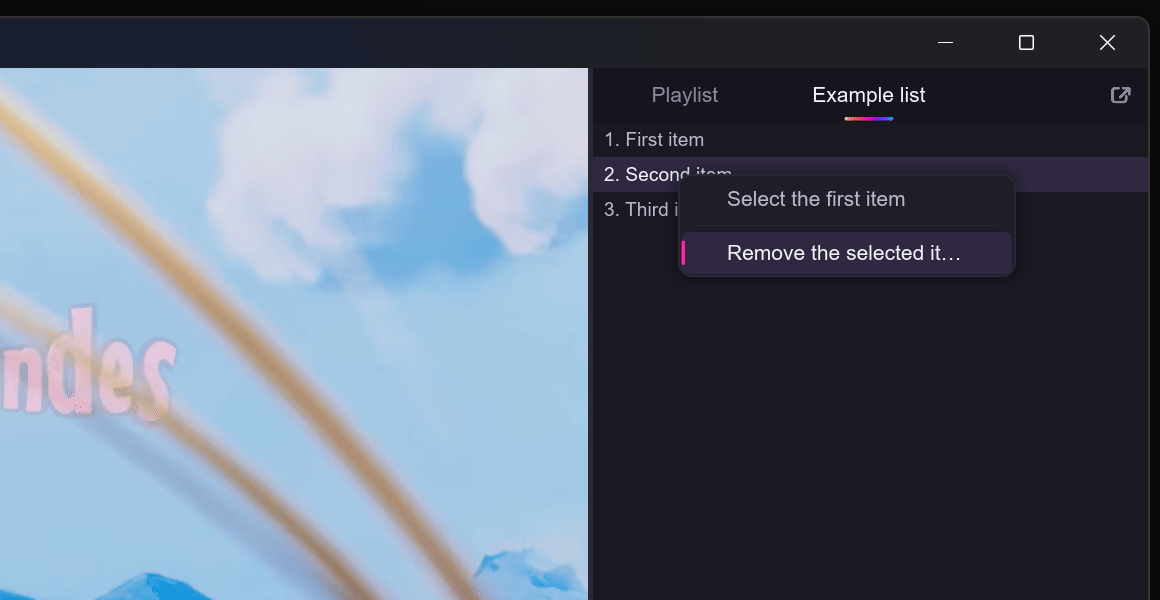
- Three items in the sidebar, right of the video. A click selects one.
- A right-click selects the item under the pointer and opens a menu: Select the first item, a separator, Remove the selected item.
Several plugins can have a panel in the sidebar: each is a tab. Next to the player's playlist, this example is a second tab labelled "Example list" (its title); the player draws the tab strip above it, and with only this panel there is no strip.
Files
examples/panel-menu/
manifest.json identity
main.ts the code (style A)
main-b.ts, main-c.ts the same plugin in styles B and C
ui/panel.slint the list
tests/panel-menu.test.ts tests against the SDK's in-memory player
package.json the SDK as a dev dependency, and the scripts
The manifest
{
"id": "examples.panel-menu",
"version": "0.1.0",
"apiVersion": "vestra/1",
"entry": "main.ts",
"minPlayerVersion": "0.9.0"
}
commands for the two menu commands, ui.mount for the panel and its menu.
The list in Slint
import { ListView } from "std-widgets.slint";
import { Theme } from "@vestra/theme.slint";
export global ListBridge {
in property <[string]> rows;
in property <int> selected;
callback select(int);
callback context-menu(float, float);
}
export component ListPanel inherits Rectangle {
background: Theme.bg-list;
min-width: 200px;
// A ListView builds only the rows in view and scrolls the rest, so the
// list costs the same with three rows or thirty thousand.
ListView {
for row[index] in ListBridge.rows: Rectangle {
height: 20px;
background: index == ListBridge.selected ? Theme.selected-bg : transparent;
Text {
x: 6px;
text: (index + 1) + ". " + row;
color: index == ListBridge.selected ? Theme.text : Theme.text-list;
font-size: Theme.font-body;
vertical-alignment: center;
}
TouchArea {
pointer-event(event) => {
if event.kind == PointerEventKind.down {
ListBridge.select(index);
}
if event.kind == PointerEventKind.up && event.button == PointerEventButton.right {
ListBridge.context-menu((self.absolute-position.x + self.mouse-x) / 1px,
(self.absolute-position.y + self.mouse-y) / 1px);
}
}
}
}
}
}
Themeis the player's palette, supplied at run time as@vestra/theme.slint, so the list follows the player's colours.- The global
ListBridgeholds the properties and callbacks. A panel is part of the player's main window, and the player makes a new instance of the component whenever the panel's place is made again (the sidebar closed and opened, its fullscreen overlay, its floating window). The global stays put, so the plugin talks to it, not to the component.rowsis the list (an array in TypeScript) andselectedthe selected index.select(int)reports a click;context-menu(float, float)asks for the menu at a point.
- The component inherits
Rectangle, notWindow: the player places it. AListViewfromstd-widgets.slintfills it;for row[index] in ListBridge.rowsinside it gives one 20-pixel row per item, and the selected row getsTheme.selected-bg. TheListViewcreates only the rows in view and scrolls the rest, so the panel stays cheap however long the list grows; a bareforin a layout would build every row up front (andvestra-plugin checkwarns about one over a bound array). - The
TouchAreaof each row: any button going down selects the row. The right button coming up asks for the menu, at the pointer's position in the window (absolute-positionis the row's position,mouse-x/mouse-ythe pointer's position in it, and/ 1pxmakes a plain number).
The code
The state
// Session storage outlives standby: with its tab in the background the
// player may stop this plugin, and showing the tab starts it again.
const { session } = plugin.storage;
const items = (await session.get<string[]>("items")) ?? [
"First item",
"Second item",
"Third item",
];
let selected = 0;
The list's titles and the selected index. Everything below reads and changes these two values.
- The list is kept in plugin.storage.session: while another tab is the current one the panel keeps nothing running, so the player may stop the plugin, and showing the tab starts it again from the stored list.
Mounting the panel
const panel = plugin.panels.mount("sidebar", "ui/panel.slint", {
title: "Example list",
});
// Sent when the panel mounts, then whenever a value changes.
panel.bind(() => ({ rows: items, selected }));
- plugin.panels.mount puts the file's component in the
"sidebar". The SDK finds the component and the global by theirexportlines.titleis used when the user detaches the sidebar into its own window. bindkeeps the global'srowsandselectedequal to the state. The SDK re-runs it after every handler and command, and compares values, so an array changed in place (splice) is still sent.
The commands behind the menu
const first = plugin.commands.add({
id: "first",
title: "Select the first item",
run: () => (selected = 0),
});
const remove = plugin.commands.add({
id: "remove",
title: "Remove the selected item",
enabled: () => items.length > 0,
run: () => {
items.splice(selected, 1);
void session.set("items", items);
selected = Math.max(0, Math.min(selected, items.length - 1));
},
});
- Neither command has a
path, so neither is in the main menu. A command without a path needs atitle: the text in the right-click menu and in the shortcut settings. enabledgreys Remove out when the list is empty.removetakes the item out and keepsselectedinside the list.
The callbacks and the menu
// Callbacks of the bridge global; `bind` above sends the new selection.
panel.on("select", (index: number) => (selected = index));
// x and y: the pointer in window pixels, from the Slint file.
panel.on("contextMenu", (x: number, y: number) =>
panel.showMenu([first, null, remove], { x, y }),
);
- panel.on handles the global's callbacks.
contextMenuis TypeScript's spelling ofcontext-menu. - panel.showMenu opens a menu of this plugin's commands at the point;
nullis a separator. Picking an item runs the command. Because the items are commands, they get disabled states and shortcut text for free.
In style B and C
main.ts is the main version, in style A (Tutorial): bind keeps the panel equal to the state and the SDK compares the list with what it sent. Two more entry files hold the same plugin in the other styles; point the manifest's entry at one to run it.
Style B (main-b.ts): no binding and no enabled function. After each change the plugin sends the state itself: the list whole (the SDK neither compares it nor makes a row patch of it) and enabled as a value.
// Send the state: whole values, as often as it changes.
const show = () => {
panel.set({ rows: items, selected });
remove.set({ enabled: items.length > 0 });
};
Style C (main-c.ts): the list is written directly with plugin.wire.view(panel), once whole when the panel shows, and a removal is the plugin's own row operation (writeRows): only { op: "remove", at, count: 1 } crosses to the player. The commands stay commands.add ones, because showMenu takes those. Experimental: the protocol's row operations change with player versions.
const direct = plugin.wire.view(panel); // writes below set() and bind()
/** A write refused because the panel does not show: nothing to do. */
const dropped = () => {};
const select = (index: number) => {
selected = index;
direct.write("selected", { value: selected }).catch(dropped);
};
// Direct writes need a panel that shows: the whole list once it does.
panel.ready
.then(() => direct.write("rows", { value: items }))
.then(() => select(selected))
.catch(dropped);
// showMenu takes commands made with commands.add, so they stay.
const first = plugin.commands.add({
id: "first",
title: "Select the first item",
run: () => select(0),
});
const remove = plugin.commands.add({
id: "remove",
title: "Remove the selected item",
run: () => {
const at = selected;
items.splice(at, 1);
void session.set("items", items);
// One row operation: only the removal crosses to the player.
direct.writeRows("rows", [{ op: "remove", at, count: 1 }]).catch(dropped);
select(Math.max(0, Math.min(at, items.length - 1)));
remove.set({ enabled: items.length > 0 });
},
});
The tests run both tests against each entry file.
The tests
import assert from "node:assert/strict";
import test from "node:test";
import { startPlugin, TestHost } from "@vestra-player/sdk/testing";
import activate from "../main.ts";
import activateB from "../main-b.ts";
import activateC from "../main-c.ts";
const directory = new URL("..", import.meta.url);
// The same behaviour from each entry file: style A (main.ts), B and C.
for (const [style, entry] of [
["A", activate],
["B", activateB],
["C", activateC],
] as const) {
test(`a right-click opens the panel's own menu (style ${style})`, async () => {
const { host, stop } = await startPlugin(entry, { directory });
const panel = host.mounted();
panel.emit("select", 2); // the right button goes down on the third row…
panel.emit("context-menu", 40, 60); // …and comes up
await host.settle();
assert.deepEqual(host.menus.at(-1), {
items: ["first", null, "remove"],
x: 40,
y: 60,
});
await stop();
});
test(`the menu's commands change the list (style ${style})`, async () => {
const { host, stop } = await startPlugin(entry, { directory });
const panel = host.mounted();
panel.emit("select", 1);
await host.command("remove").run();
await host.settle();
assert.deepEqual(panel.props.rows, ["First item", "Third item"]);
assert.equal(panel.props.selected, 1);
await host.command("first").run();
await host.settle();
assert.equal(panel.props.selected, 0);
await stop();
});
test(`in a background tab nothing keeps it running, and the list outlives a stop (style ${style})`, async () => {
const host = new TestHost();
host.mountOther("sidebar", "vestra.playlist", { title: "Playlist" });
const first = await startPlugin(entry, { directory, host });
const keepsRunning = () => host.keepsRunning;
await host.settle();
host.selectTab("vestra.playlist");
await host.settle();
assert.deepEqual(keepsRunning(), []);
host.mounted().emit("select", 0);
await host.command("remove").run();
await host.settle();
await first.stop({ reason: "idle" }); // standby
// Showing the tab again starts it in the same player session.
const again = await startPlugin(entry, {
directory,
sessionStorage: host.sessionStorage,
});
await again.host.settle();
assert.deepEqual(again.host.mounted().props.rows, [
"Second item",
"Third item",
]);
await again.stop();
});
}
host.mounted()is the panel:emitfires a callback of the global,propsholds its properties.host.menus.at(-1)is the last menu the plugin opened: the command ids,nullfor the separator, and the point.host.command(id).run()acts like picking the item in the menu.
Run it
npm ci # once, in the SDK repository root
cd examples/panel-menu
npm install
npm run check && npm test
npm run pack # examples.panel-menu-0.1.0.vxp
Start the player with --plugin <path to examples/panel-menu>, click the Example list tab above the playlist, then right-click an item. The menu opens only while the tab is the current one (showMenu rejects with unavailable in a background tab).
Try next
- Keys that only work in the panel. Add
focus: "panel"andbindings: ["Delete"]to Remove: the key then works only while the list has focus, and keeps its usual meaning elsewhere. - Next and previous. Call plugin.player.provideSequence with
canNext,canPrevious,nextandpreviousthat moveselected(and callawait plugin.player.read()first inactivate): the player's own next/previous controls then step through the list. - A check mark in the menu. Add a command with
checked: () => …and put it in theshowMenulist.